

The short answer
Face a soft light source, put the lens at eye level, fill the frame from mid-chest up, mute when idle, and prefer a dedicated mic over the laptop. Gear helps after those basics.
Light
- Brightest light in front of you, not behind
- A window to your face beats a dark silhouette
- Avoid strong overheads that dig eye shadows
Camera height and framing
Stack books or use a monitor-top mount so the lens meets your eyes. Looking down into a laptop reads as disengagement. For monitor layouts see monitor setup.
Webcam choices (listings, not reviews)
As an Amazon Associate we earn from qualifying purchases — more in our affiliate disclosure
Logitech C920x HD Pro is a common 1080p step-up. Logitech 4K Webcam (Brio family) is a 4K Logitech listing if you need crop room. We have not hands-on tested units for this article — use return windows.

Audio
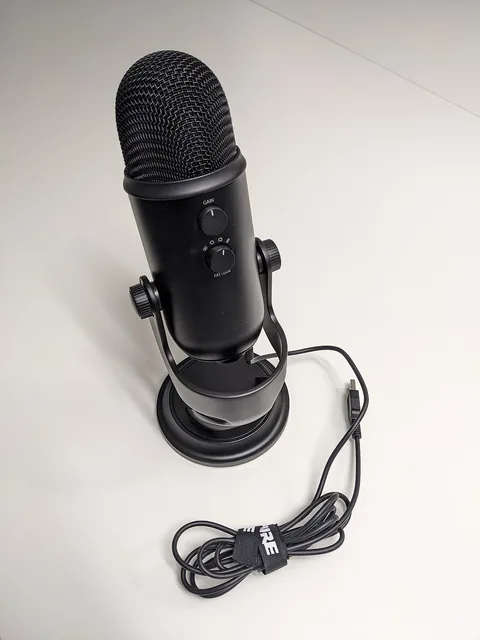
Close mics win. FIFINE K669B USB Microphone and Blue Yeti USB Microphone are USB condenser options for quiet rooms. Headphones stop echo; ANC pairs are covered in ANC for remote work.
Bandwidth
Upload stability matters as much as download. Run a speed check before important calls — internet speed for WFH.
Etiquette that reads as polish
- Join one minute early when DST shifts — time zones
- Mute when not speaking
- Look at the lens for emphasis, not only the gallery
Remote: Office Not Required on remote norms; Indistractable on staying present when notifications attack.
Lighting in more detail
Three soft sources beat one harsh lamp. Put the key light in front of you, slightly above eye level; add a weaker fill on the other side; optionally add a soft backlight that separates your shoulders from the wall. A single desk lamp behind the camera, bounced off a white wall, is enough for many rooms.
Colour temperature consistency matters more than absolute warmth. Mixing a cool monitor with a warm lamp turns skin green or orange. Close bright windows behind you so the webcam is not fighting a silhouette. If auto white balance oscillates, simplify the scene to one dominant light family.
Framing and eye line
Leave modest headroom; crop near mid-chest so hand gestures remain visible. Looking only at the gallery view trains your eyes downward relative to the lens. Park the meeting window on the monitor that holds the camera. Virtual backgrounds that clip hair cost CPU; a tidy real wall usually looks more professional.
Audio checklist
- Mute OS notifications and calendar chimes before joining
- Select the microphone inside the meeting app, not only in system settings
- Wear headphones to prevent echo even if you prefer speakers
- Keep USB condensers roughly 15–40 cm from your mouth and watch plosives
- Keep a phone headset ready as a cold backup
FIFINE K669B USB Microphone and Blue Yeti USB Microphone are USB mic listings for quiet rooms. On noisy streets, closed-back ANC headphones from the ANC guide help more than another webcam upgrade.
When bad video is bandwidth
Meeting apps drop resolution when upload saturates. Pause cloud backups and large sync folders during client demos. Ethernet to the router remains the reliability upgrade. Details in internet speed for WFH.
Two-minute pre-call ritual
Stand, straighten the camera, check light direction, open notes, join muted, unmute when greeted. That ritual beats a third ring light. Remote: Office Not Required covers remote norms; Indistractable covers attention once the camera basics are settled.
Accessibility and inclusivity
Speak clearly, avoid talking over captions, and describe key on-screen actions when colleagues join by audio only. Prefer high-contrast slide themes. If you record, tell participants first and share the file promptly so people in other time zones are not punished for missing the live slot — see scheduling across time zones.
Gear tiers without fake reviews
Tier 1: light + eye-level laptop. Tier 2: add Logitech C920x HD Pro or similar 1080p webcam and a USB mic. Tier 3: Logitech 4K Webcam (Brio family) 4K listing if you crop heavily. We have not hands-on ranked units; use return windows and published specs.
Field notes for daily calls
Most people under-invest in audio and over-invest in 4K stickers. Colleagues forgive soft video; they struggle with echo and ceiling cameras.
Keep a literal kit list: lamp position, camera height, mic choice, backup headset. Tape it inside the laptop lid for travel days.
If you lead meetings, open with a clear agenda slide so late joiners from other zones can catch up without interrupting — pairs with timezone hygiene.
Operational checklist
- Test recording a 60-second sample weekly
- Wash foam windscreens / wipe lenses
- Update webcam firmware when vendors ship fixes
- Agree team norms for cameras-on vs cameras-optional
Pitfalls
- Ring lights that blind you and wash out the background
- Virtual backgrounds on underpowered CPUs
- Forgetting to switch mic input after plugging a headset
Source habit
Re-open the primary sources linked in this article whenever a vendor revises enrolment rules, specification tables or programme dates. Screenshot the version you relied on when making a purchase decision. Treat affiliate product boxes as convenience links to live listings — confirm price, seller and compatibility yourself.
Scope reminder
This is general education published 28 October 2026. It is not personalised advice, not a hands-on review lab, and not a guarantee that a product will fit your desk, jurisdiction or threat model. When money, debt, tax or legal status is involved, speak with a qualified professional in your country.
Implementation notes
When you apply the ideas in this guide on how to look good on video calls, write down your starting point before changing anything. Baselines make it obvious what helped.
Prefer primary documentation over social-media summaries. The Sources section at the bottom of the article is the verification trail for 28 October 2026.
If a product box appears, treat it as a convenience link to a live Amazon listing via our affiliate disclosure — confirm compatibility, seller and returns yourself.
Internal links to other Remotely Scaled posts exist so you can deepen one decision at a time instead of boiling the ocean in a single shopping night.
For money topics, remember the not-advice callout: local tax, labour and consumer-credit rules differ. For security topics, your threat model differs from a random blogger’s.
Revisit the article after major OS, silicon or programme changes. Specification pages and enrolment portals move; your notes should capture which version you trusted.
Share the checklist with a teammate or partner and ask them to spot gaps. Fresh eyes catch missing cables, missing MFA backups and missing invoice fields.
Time-box implementation: sixty focused minutes beat a weekend of half-finished upgrades that leave the desk worse than before.
When evidence quality is low or vendor footnotes dominate, say so out loud in your decision log. Confidence theatre is expensive.
Keep receipts, serial numbers and firmware versions in one folder. Warranty and incident response both need that paper trail.
If you travel, photograph cable layouts and store a redundant critical file offline. Mobility without redundancy is hope as a strategy.
Review cadence
Schedule a thirty-minute review thirty days after you apply this article. Keep what worked, undo what did not, and update your personal checklist. That cadence turns a blog post into an operating habit without pretending a single page can see your full context.
If you work with others
Paste the short answer and the checklist into your team wiki. Agree who owns updates when vendors change URLs. Consistency across freelancers and teammates matters more than any one person memorising every caveat.
Products mentioned
The products linked above, with what to check before you buy. They are examples, not endorsements; we have not been paid to include any of them.
FAQ
What improves calls most?
Light on your face, camera at eye level, stable internet, and a microphone closer than the laptop mics.
Do I need 4K?
1080p is enough for most meetings. 4K helps if you crop or sit farther back — Logitech 4K Webcam (Brio family) vs Logitech C920x HD Pro.
Audio priority?
Yes. A simple USB mic such as FIFINE K669B USB Microphone or Blue Yeti USB Microphone often beats built-in laptop mics in quiet rooms.
Background?
Uncluttered and non-distracting beats heavy virtual backgrounds that chew CPU.
Noise?
Further reading
Books we think are worth your time if you want to go deeper. We have not been paid to include any of them.

Remote: Office Not Required
Jason Fried & David Heinemeier Hansson
Early, practical case for distributed work.
View on Amazon ↗ Affiliate link
Indistractable
Nir Eyal
Attention and distraction — complements Deep Work.
View on Amazon ↗ Affiliate link
Book covers via Open Library; cover art belongs to the publishers.
Sources
All links opened and checked on 28 Oct 2026. Figures are as published by each source on the date shown; we did not run our own benchmarks.
- Logitech C920x / Brio Amazon listings (product existence), checked 28 Oct 2026