
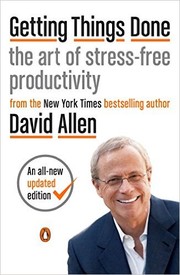
On a remote team, work arrives from everywhere: a chat mention, an email, a comment in a document, an action item from a call. If you try to remember it all, you will forget some of it and worry about the rest. Getting Things Done by David Allen is a system for getting all of it out of your head and into a list you trust.
The short answer
GTD is a five-step method: capture, clarify, organize, reflect, engage. The book was first published in 2001, and Penguin released a revised edition in 2015. Its slogan, trademarked by the David Allen Company, sums up the idea: your mind is for having ideas, not holding them. If your problem is dropped balls and a constant sense of things undone, GTD is the most complete answer.
Who it is for
- Remote workers with many inputs: chat, email, tickets, documents and meetings.
- Freelancers and contractors juggling several clients.
- Job seekers tracking many applications, follow-ups and interviews at once.
The five steps, in plain words
- Capture. Write down everything that has your attention, in one or a few collection points. Do not trust your memory.
- Clarify. For each item, decide what it means. Is it actionable? If so, what is the very next physical action? If it takes more than one step, it is a project. If it is not actionable, bin it, file it as reference, or park it for later.
- Organize. Put reminders where they belong: a calendar for things fixed in time, next-action lists, a waiting-for list, a project list.
- Reflect. Review the system often enough to trust it. Allen recommends a scheduled weekly review.
- Engage. Choose what to do with confidence, because you know what is on your plate.
Two rules from the method do most of the daily work. The two-minute rule: if an item takes under two minutes, do it now. And empty your inboxes regularly, at least weekly, without using an inbox as a to-do list.
Running GTD with remote tools
These are our suggestions for adapting the method to a distributed job:
| Input | Capture by | Common mistake |
|---|---|---|
| Chat mentions | Saving or forwarding to your task list | Leaving tasks as unread messages |
| Processing to zero once or twice a day | Using the inbox as a to-do list | |
| Meeting actions | Writing them during the call, not after | Trusting the recording to remind you |
| Document comments | A next action with a link to the doc | Hunting through docs on Friday |
| Waiting on colleagues | A waiting-for list with dates | Forgetting to follow up across time zones |
The waiting-for list is especially useful on distributed teams. If a colleague is eight hours away, a request may sit for a day; writing down when you asked makes the follow-up easy and polite. See our guide to working across time zones.
The weekly review, remote edition
- Clear every inbox: email, chat saved items, notes from calls, paper.
- Look at last week's calendar for loose ends and next week's for preparation.
- Go through each project and make sure it has a next action.
- Check the waiting-for list and send follow-ups.
- Scan the someday list for anything that has become relevant.
Thirty to sixty minutes on Friday afternoon is typical. It also works as a natural end to the week, which remote workers often lack.
GTD for a job search
Treat each application as a project. The next action might be "tailor CV summary for this role", then "send", then "follow up on date X". A waiting-for list with dates stops applications from vanishing. Capture new roles from our daily remote jobs page into a "to review" list instead of opening twenty tabs.
When to skip it
- Your work has few inputs. If tasks come from one place and you rarely forget things, GTD is more system than you need.
- You love building systems more than using them. GTD can become a hobby. Make Time or Essentialism are lighter.
- Your issue is too much work. GTD shows you everything you have agreed to; it does not tell you what to drop.
The verdict
For remote workers flooded with inputs, GTD is still the best-known way to stop losing things. Start small: capture everything for a week, process it daily, and hold one weekly review. If that alone lowers the background stress, the rest of the book is worth it.
The Amazon link for Getting Things Done is the first card under Further reading below, with a few books that pair well with it.
FAQ
What are the five steps of GTD?
Capture, clarify, organize, reflect and engage, as described on the David Allen Company's site.
What is the two-minute rule?
When you process your inbox, anything that takes less than two minutes is done immediately rather than added to a list.
What is the weekly review?
A regular session where you go through all your lists and projects to bring them up to date. Allen recommends scheduling it.
When was the book published?
First in 2001. Penguin published a revised edition in 2015.
Which app should I use for GTD?
Any app with lists and a calendar works. The method matters more than the tool; many people start with paper.
Further reading
Books we think are worth your time if you want to go deeper. We have not been paid to include any of them.
As an Amazon Associate we earn from qualifying purchases — more in our affiliate disclosure
Getting Things Done
David Allen
Capture and next-action system still widely used by knowledge workers.
View on Amazon ↗ Affiliate link

Make Time
Jake Knapp & John Zeratsky
Daily highlight and energy-first scheduling for busy makers.
View on Amazon ↗ Affiliate link
Deep Work
Cal Newport
A practical framework for protecting long stretches of focus — useful for solo founders and remote workers.
View on Amazon ↗ Affiliate link
Book covers via Open Library; cover art belongs to the publishers.
Sources
All links opened and checked on 16 Nov 2026. Figures are as published by each source on the date shown; we did not run our own benchmarks.
- David Allen Company: What is GTD?, checked 5 Nov 2026
- Wikipedia: Getting Things Done, checked 5 Nov 2026